michael.pendergrass
Acronym
Quivr CRM
Product ID
Quivr_CRM
Logo

Description
Salesforce overlay CRM built for financial advisors, by advisors.
Images
Image
Details
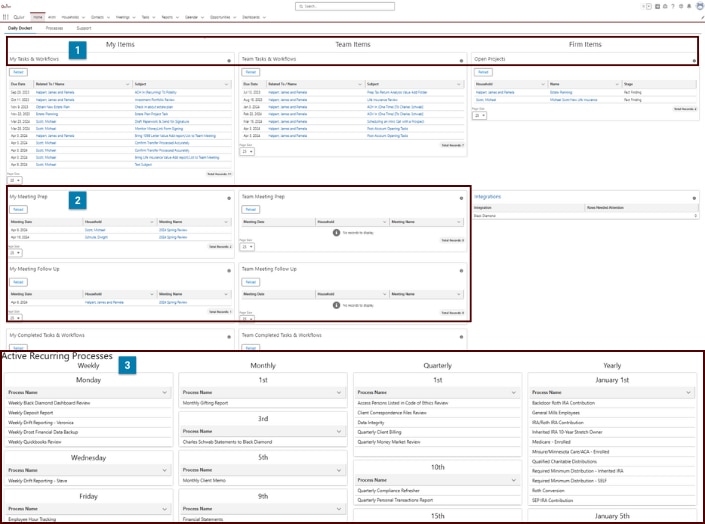
- The Quivr Home Page is your command center—organizing My Items, Team Items, and Firm Items so you can quickly view what’s on your plate, stay in sync with your team, and keep firm-wide priorities front and center.
- Stay on top of client conversations with My Meeting Prep, My Meeting Follow Up, Team Meeting Prep, and Team Follow Up—giving you and your team a clear view of what’s coming up and what needs to be done after every meeting.
- The Processes tab is your calendar view of all active and inactive Recurring and Date-Driven Processes set up through Archr—giving you a clear snapshot of what’s happening and when, so nothing falls through the cracks.
Image
Details
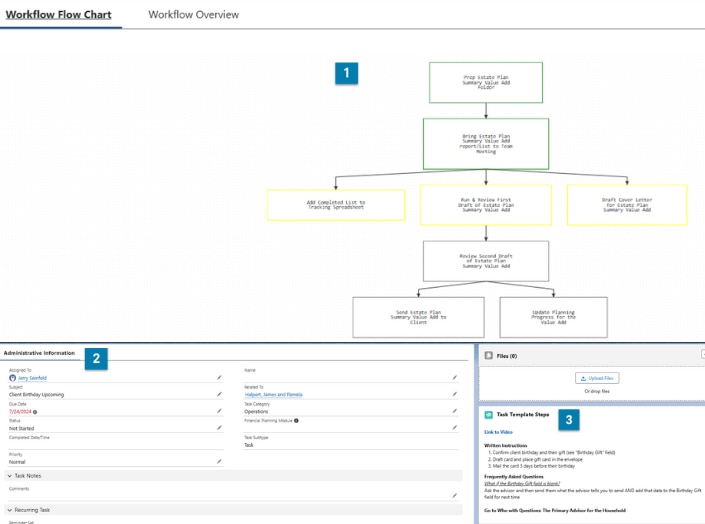
- Quivr workflows let you automate with precision—use conditional logic to guide tasks down different paths based on client needs, status, or responses. Build smarter, more flexible processes that adapt as you go.
- Inside each workflow task, you'll see key administrative info: who it's assigned to, subject, due date, related household, and space for notes—so everything stays clear and actionable.
- Task Template steps in Quivr let you add videos, written instructions, FAQs, and where to go for help—so team members have everything they need, right when they need it, to complete the task with confidence and consistency.
Features
Salesforce overlay CRM built for financial advisors, by advisors:
- Purpose-built CRM tailored for financial advisors.
- Seamlessly integrates with the industry's top tools.
- Enhances efficiency with workflow automation.
Vendors
Management Style
Schwab Products
Section